The Capy Family / CapyM

CAPYM · BUSINESS INTELLIGENCE

CapyM brings projects, customers and follow-ups into one system.

CapyM by RoboCloud connects projects, customer records, quotations, documents and financial context across teams. Customize the workflow around your business, with AI summaries and LINE OA support within the agreed scope.

01 / The operational problem

Your teams have their own workflows. Connect the work they share.

Each team has its own tools, records and ways of working. People have to move between programs to follow the same job. We start by understanding the customer, then shape CapyM around the work so teams can share one operating view.

Data and source context

  • Projects
  • CRM
  • Quotation
  • Documents
  • AR
  • Excel
  • Follow-up
  • People
CapyMOperational context

What the team reviews

  • Today
  • Risk
  • Follow-up
  • Project Status
  • Customer Context
  • AI Brief
Conceptual workflow · Actual data sources and connections are confirmed for each implementation.

02 / What the user sees

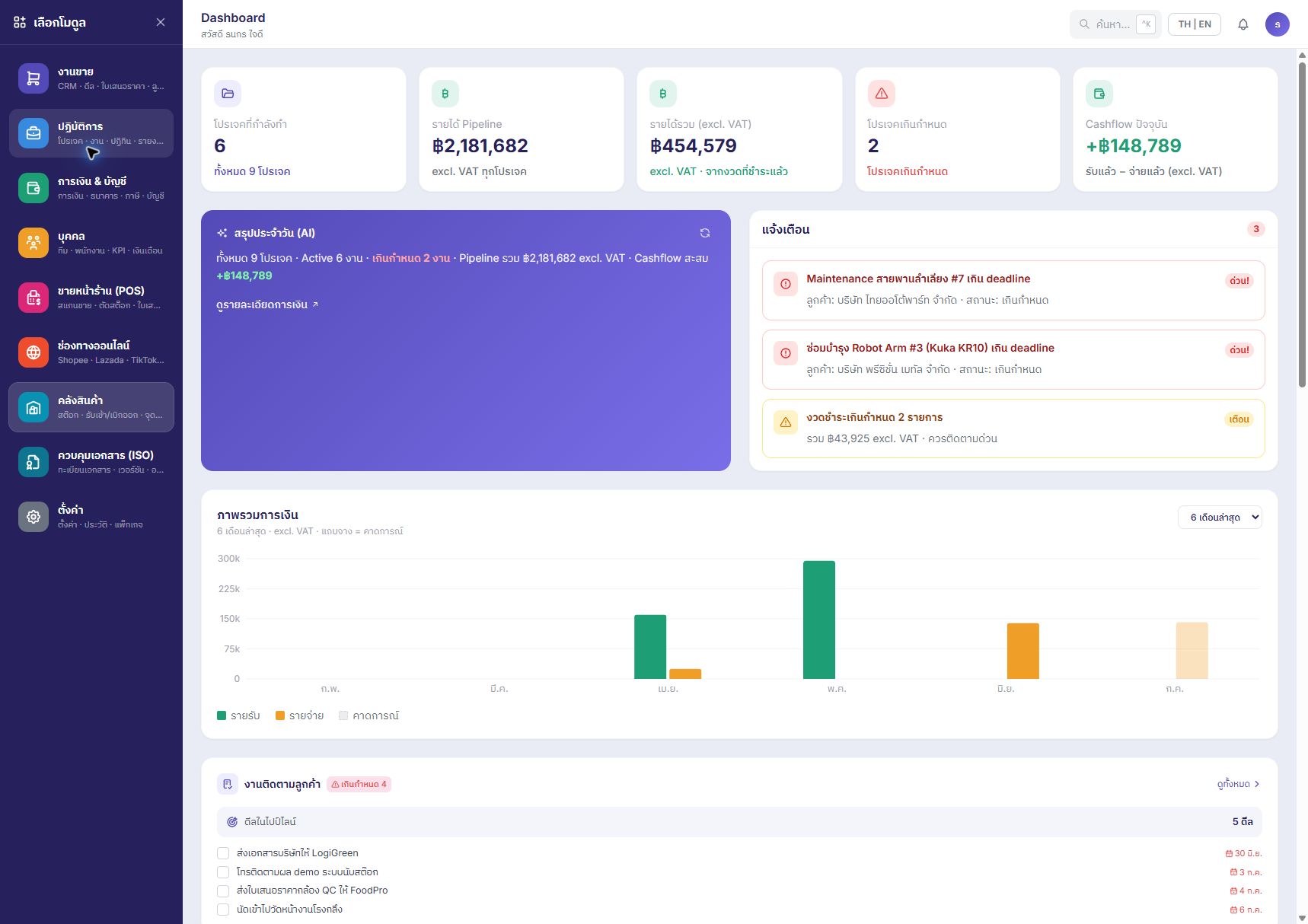
Open the day with the work that needs a conversation.

CapyM — Actual product · Projects, follow-ups and finance · Demonstration data
Actual product · Projects, follow-ups and finance · Demonstration dataOpen full image (new tab) ↗
01

Projects

Follow delivery status, planned work and responsible people before a delay becomes a surprise.

02

Customers

Keep customer context alongside the projects and follow-ups it affects.

03

Documents

Find the records that support a decision without asking every team for another copy.

04

Sales / Quotation Context

See a quotation in the context of its customer and next follow-up.

05

Financial Signals

Bring receivables, due dates and project cash flow into the operating conversation.

06

AI Daily Brief

Start with a summary, then review the underlying work with its owner.

CAPYM / Evaluate your workflow

Connect project, customer, quotation and document work across teams

For project- and operations-driven companies: project managers, sales teams and business leaders who need to coordinate work across people and departments.

An example journey to review in your demo

Use one real company workflow to review who needs each piece of context and what needs following up.

  1. 01

    Customer and quotation

    Sales reviews the customer context, quotation and next follow-up.

  2. 02

    Project and responsible people

    Project teams review the plan, delivery status and who to speak with next.

  3. 03

    Documents and financial context

    The relevant teams review supporting records, receivables and due dates.

  4. 04

    Brief and decisions

    Use the AI Daily Brief as a starting point, then verify source records with their owner.

An evaluation example · Actual steps and data connections are agreed for your company's workflow.

Six points to check when evaluating CapyM

Projects

Follow delivery status, planned work and responsible people before a delay becomes a surprise.

Check in the demo: Choose one project and check how the team follows responsible people and delivery status.

Customers

Keep customer context alongside the projects and follow-ups it affects.

Check in the demo: Find the same customer context from both the sales and project teams' perspectives.

Documents

Find the records that support a decision without asking every team for another copy.

Check in the demo: Bring sample documents and identify which records support a decision.

Sales / Quotation Context

See a quotation in the context of its customer and next follow-up.

Check in the demo: Choose one quotation and review the next follow-up.

Financial Signals

Bring receivables, due dates and project cash flow into the operating conversation.

Check in the demo: Specify the financial context you need and accounting work requiring further scope review.

AI Daily Brief

Start with a summary, then review the underlying work with its owner.

Check in the demo: Check which source work supports the AI brief and who decides the next action.

03 / The role of AI

A clearer starting point for the next decision.

AI helps surface context across business operations and summarize items to follow up. Project intelligence is useful when the team can connect a signal to the customer, record and person responsible.

What AI does not do

AI helps surface context. People remain responsible for approval and action. It does not autonomously manage the company, approve spending or send customer commitments on your team's behalf.

04 / Fit with existing systems

Start with the operation you already have.

We start with the programs and workflows your teams already use. Together we define what should move into CapyM, what needs a connection, and how AI and LINE OA should support the work. Customization, migration and integration scope are agreed for each customer.

05 / Implementation

Agree the scope. Start with a useful decision.

  1. 01

    Discover

    Map one cross-team workflow and its current points of friction.

  2. 02

    Connect

    Identify record owners, data sources and any agreed import or connection needs.

  3. 03

    Configure

    Set up project context, responsibilities and the follow-ups your team needs.

  4. 04

    Use

    Review the daily brief together and keep source records current.

Scope and implementation plans depend on data, existing systems and team readiness, and are agreed after discovery.

Before you get started

Who is CapyM for?

For project- and operations-driven companies: project managers, sales teams and business leaders who need to coordinate work across people and departments.

What should we prepare for a walkthrough?

Bring one project journey, the teams involved and an example of a follow-up that often gets missed.

How does it fit existing systems?

We start with the programs and workflows your teams already use. Together we define what should move into CapyM, what needs a connection, and how AI and LINE OA should support the work. Customization, migration and integration scope are agreed for each customer.

What are the limits of AI?

AI helps surface context. People remain responsible for approval and action. It does not autonomously manage the company, approve spending or send customer commitments on your team's behalf.

Can CapyM immediately replace an ERP or tax accounting system?

Evaluate the specific work you need. The scope described on this page covers projects, customers, quotations, documents and financial signals. If you need inventory, tax accounting or regulated documents, bring those requirements and your existing software to RoboCloud for scope review before an agreement.

What should we prepare to assess CapyM pricing and implementation time?

Prepare the number of users, participating teams, one workflow, sample records and a list of current programs. Identify the changes, migration and connections you need, then review scope, pricing and the implementation plan with RoboCloud.

How does CapyM connect sales and project teams?

CapyM brings customer, quotation, project, document and follow-up context together so teams can review progress with the responsible person. Start the assessment with one real workflow, such as moving from a quotation into project delivery, and agree the steps and scope with RoboCloud.

Do we need to replace every existing program to use CapyM?

Begin by reviewing your existing programs and data. Agree which work belongs in CapyM and which systems need a connection. Migration, customization and LINE OA scope are assessed for each customer; bring an example workflow and a list of current systems to the demo.

06 / Your next step

Request a CapyM demo

Bring one project journey, the teams involved and an example of a follow-up that often gets missed.

Opens an email draft. Nothing is sent until you send it.

Explore another Capy product.

When should you choose CapyM? Review product selection answers →

Answers before implementation

Review preparation and scope for CapyM →