
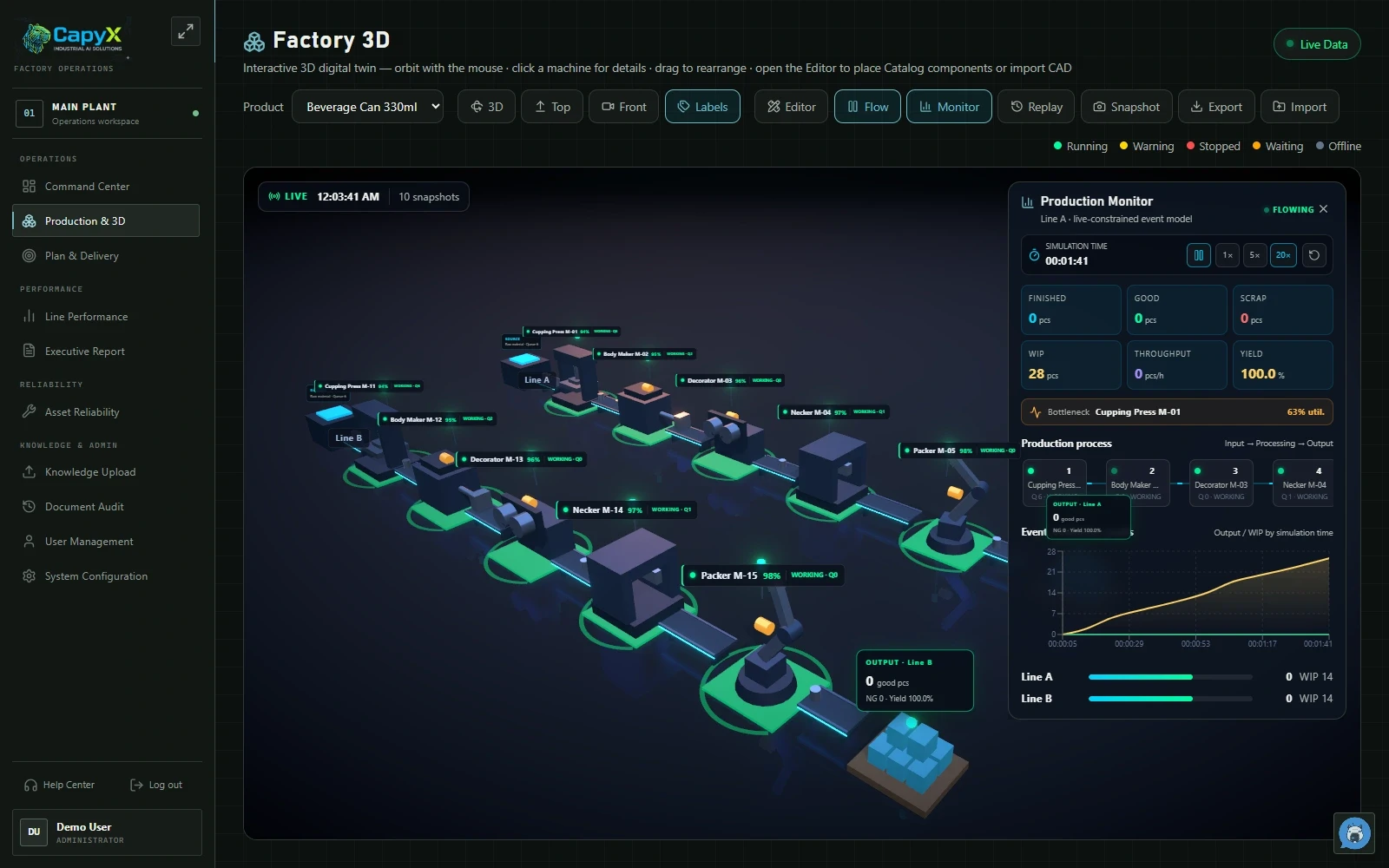
 View full image
01
Factory 3D
See machine locations and the production sequence in a factory view.
Actual product · Demonstration data
CAPYX · FACTORY INTELLIGENCE
CapyX is used by customers
CapyX combines factory data, AI and 3D Digital Twin planning. Explore production simulation, with free initial access for teaching at educational institutions.
CAPYX FOR EDUCATION
RoboCloud offers educational institutions free CapyX access during the initial period for teaching and learning. Students can use the actual system to explore machine data and AI, and practice factory layout and production simulation with Digital Twin.
Contact RoboCloud to arrange access · The button opens an email draft
CAPYX / Start with your factory question
For production leaders, factory engineers and maintenance teams preparing a shift handover, daily meeting or investigation, when machine status, production output and downtime reasons sit in separate records.
CapyX by RoboCloud helps teams review machine status, production progress, OEE and recorded downtime reasons in one operational context. Available information depends on the signals and records in scope. OEE and AI summaries start an investigation; they do not establish the cause.
Digital Twin images use simulation models and demonstration data, not live customer-factory data. Real machine connections require a signal and equipment assessment.
CAPYX / DIGITAL TWIN
Arrange equipment, define routes and task times, then simulate production to inspect queues, work in progress and possible constraints. Compare alternatives using the same assumptions in the CapyX web app.
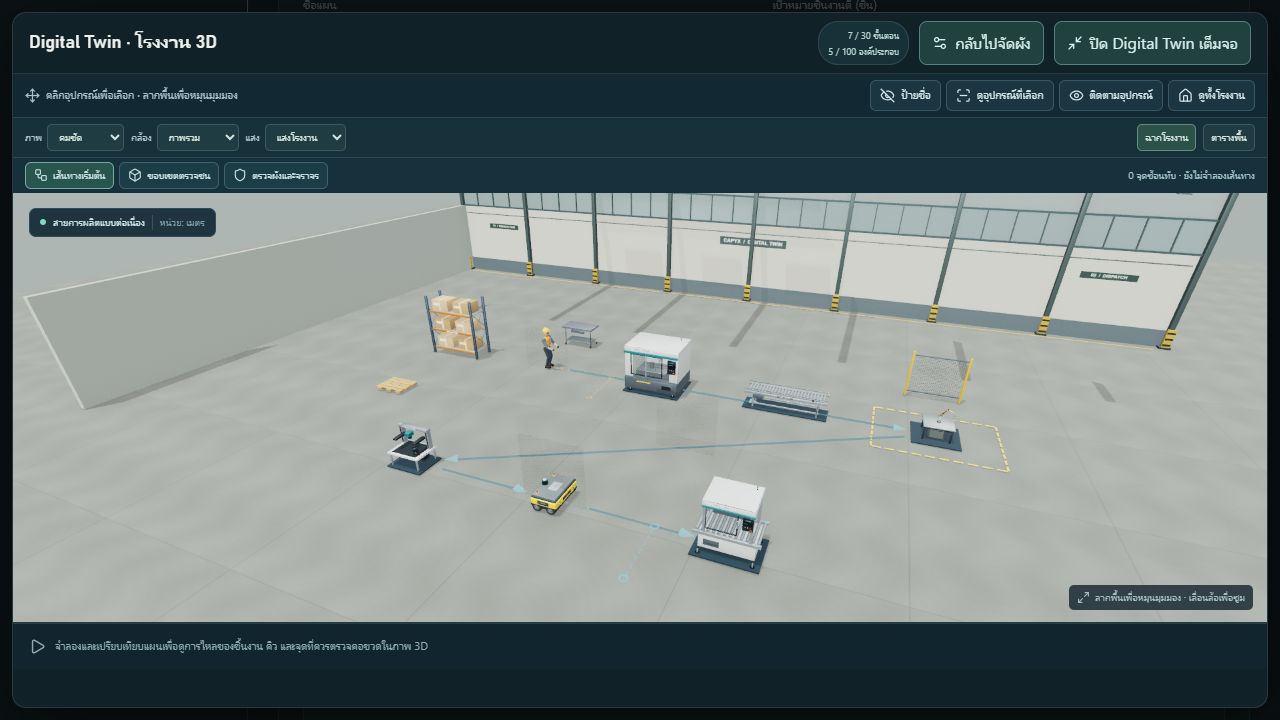
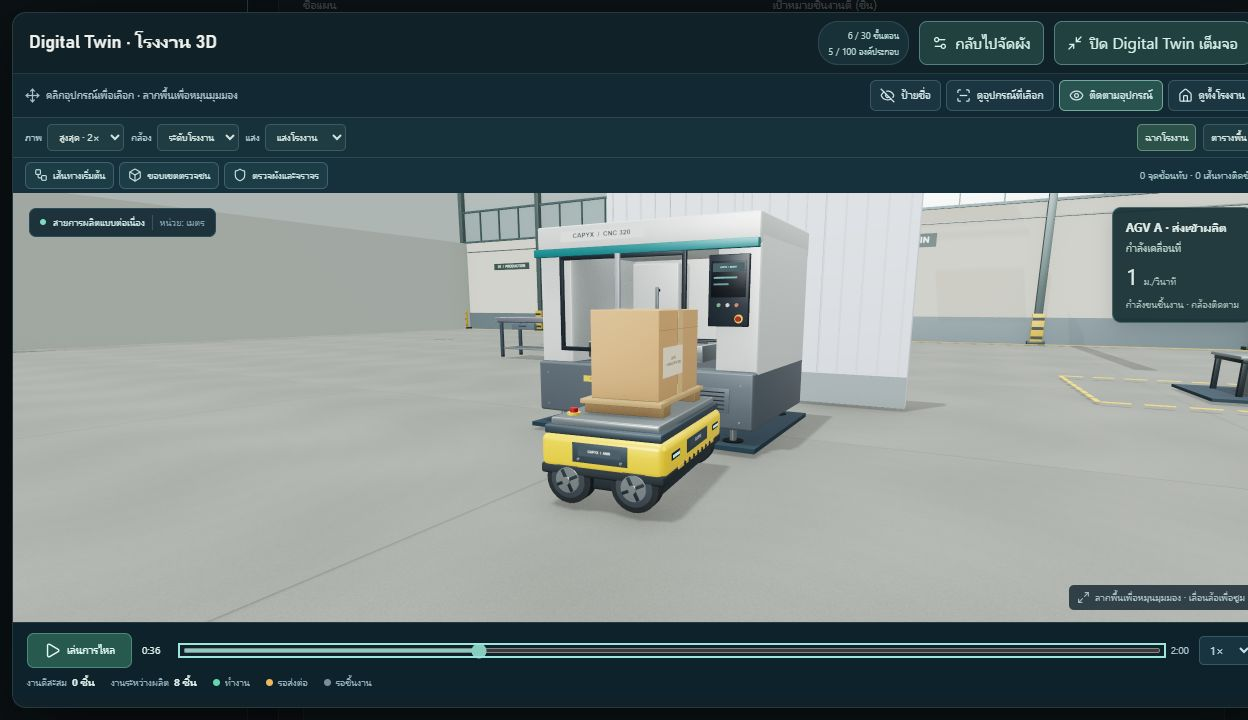
Place equipment, conveyors and work areas, then define routes for workers or AGVs.
Set cycle times, queues and arrival intervals to examine output, work in progress and station waiting.
Let students adjust one variable, explain the results with data and check their observations against a real use case.
INSIDE CAPYX / 6 PRODUCT VIEWS
Choose the workflow you want to explore. Select an image to open the full screen.
Product and demonstration screens, with enlarged details identified in each caption. Screen language is shown as captured.
View full image See machine locations and the production sequence in a factory view.
Actual product · Demonstration dataView full image An enlarged view of machines and the workflow in Factory 3D.
Detail from an actual product screen · Demonstration dataView full image Review production counts, work in progress and points requiring attention.
Detail from an actual product screen · Demonstration dataView full image Read the charts and status indicators for Line A and Line B.
Detail from an actual product screen · Demonstration dataView full image Choose views, labels and the monitor from the actual product toolbar.
Detail from an actual product screen · Demonstration data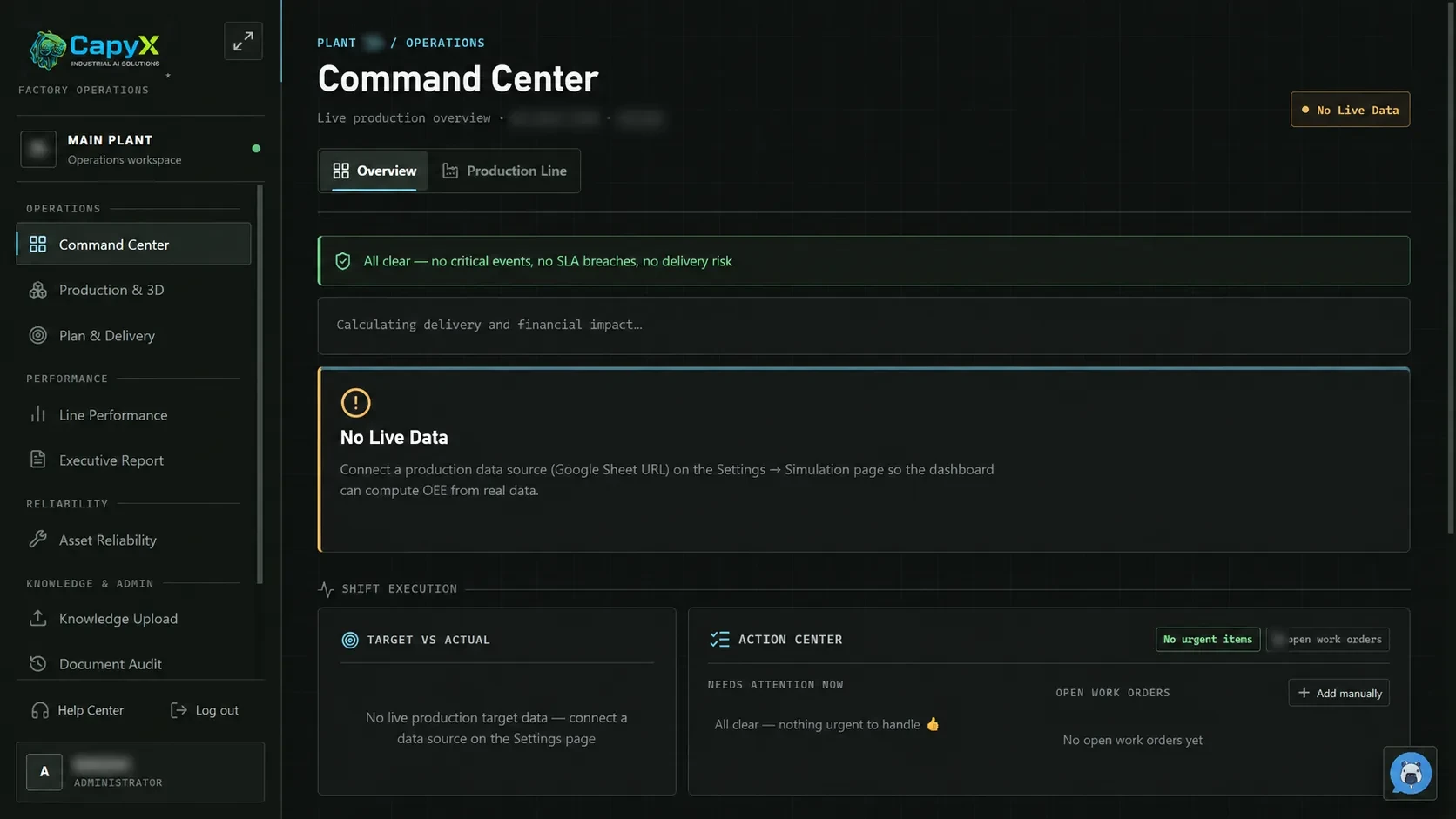 View full image
See the initial state before live data is connected.
Actual product · Identifying data redacted · No live data connectedThese screens show the interface and workflows. Records and figures are sample data or have been redacted. Available modules depend on the scope agreed for each organization.
Demonstration screens illustrate the interface and working context. They are not evidence of customer outcomes or end-to-end data connections for your organization. Review your actual workflow and agree the scope before implementation.
01 / The operational problem
A stopped machine, a missed production target and a quality issue can sit in different records. Bring the signals together so the team can start with what happened, where it happened and what to check next.
02 / What the user sees
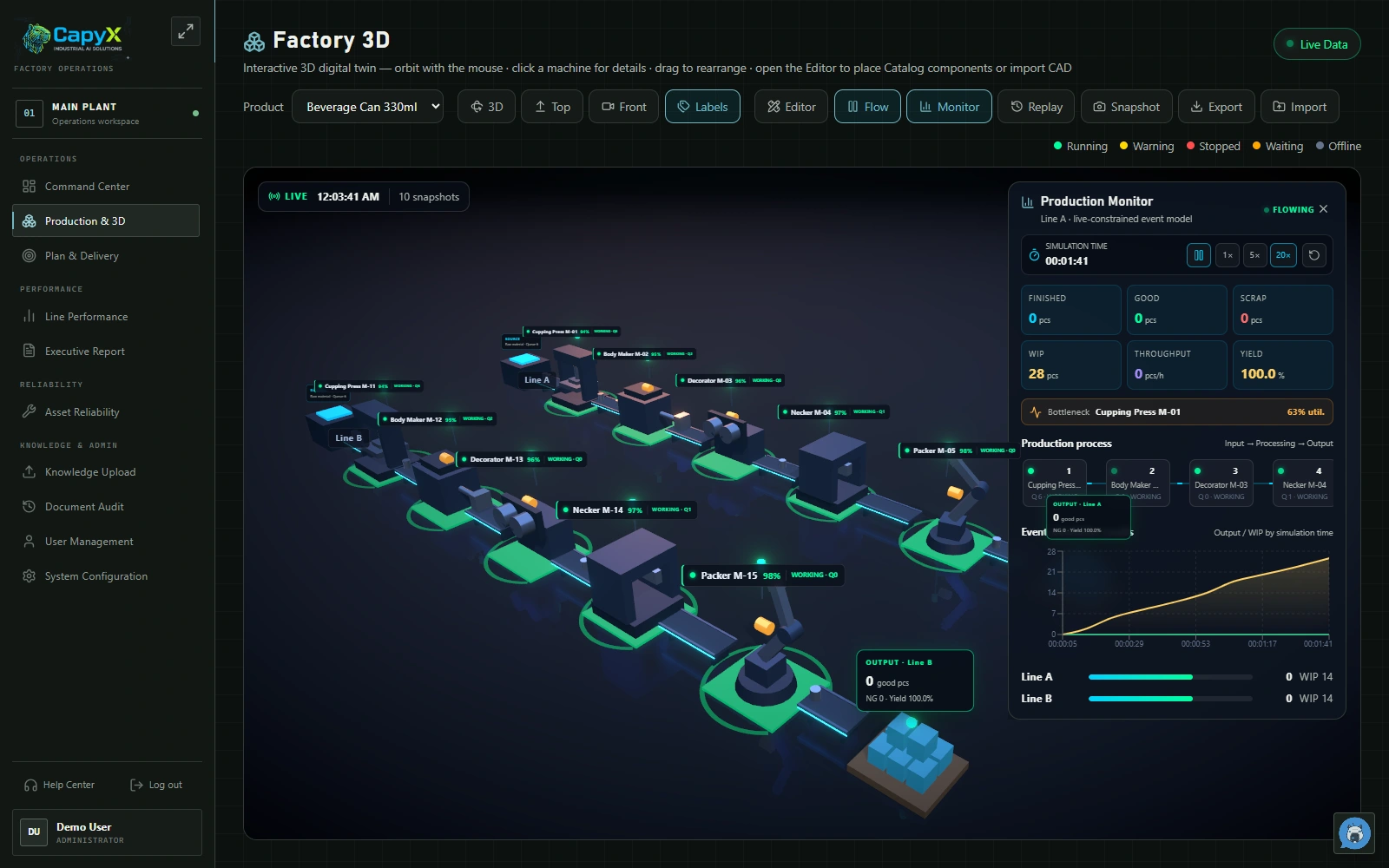
Arrange a 3D factory layout and compare production-flow scenarios using modeled inputs. Review the assumptions against shop-floor conditions before applying a plan.
Locate running and stopped equipment in the factory view before asking for an update.
Compare production progress with the plan and see where the next conversation belongs.
Read effectiveness alongside recorded downtime reasons. An OEE number starts the investigation; it does not explain it alone.
Bring quality and machine-condition signals into the same operational discussion.
Use an assisted summary to choose which events and underlying records to review first.
03 / The role of AI
Industrial AI helps summarize recorded events and surface conditions for engineering review. Its usefulness depends on available signals, reliable timestamps and the production context configured with your team.
AI does not establish the root cause or autonomously control a machine. Engineers verify the evidence and decide the response. This example does not imply every machine has vibration sensing or baseline analysis configured.
04 / Fit with existing systems
Begin with the machine signals and production records already available. CapyX's current configuration maps signals through an IoT edge device or gateway; it does not write directly into a PLC. The engineering assessment confirms the signal path, equipment compatibility and data scope before connection.
Start with one machine or production line and a defined question. Review these points with engineering and agree acceptance evidence before installation. This is an assessment checklist, not confirmation that every input is already supported.
The current configuration receives mapped signals through an edge device or gateway; it does not write directly into a PLC. Older equipment needs a signal and site assessment. Not every machine can be connected without modification.
Bring your machine list, data sources and one production problem to discuss with an engineer →No modern machine-data interface? Assess the signals first. The current setup includes edge signal mapping and an ESP DC input template. For an older machine, an engineer must confirm accessible signals, electrical compatibility and installation requirements. This is not a promise that every machine can connect without modification.
05 / Implementation
Understand machines, available data and the decisions your team needs to make.
Confirm and connect the agreed gateway, edge or sensor signal path.
Add machine, production, downtime and operational context.
Review dashboards, alerts and AI insights with the people responsible for action.
Scope and implementation plans depend on data, existing systems and team readiness, and are agreed after discovery.
Yes. Educational institutions can use CapyX free during the initial period for teaching and learning. Students can use the actual system to explore machine data, practice factory layout and simulate production with Digital Twin. Contact RoboCloud with your institution, course and intended use to arrange access.
Use it to arrange a 3D factory layout, define workstations and transport routes, simulate production flow and compare output, queues and work in progress using configured times and assumptions. It supports concept exploration and teaching before validation against the actual operation.
These are actual CapyX screens using simulation models and demonstration data, including an AGV transporting a workpiece. They do not show live customer-factory data. Connecting real machines requires an assessment of available signals, data-acquisition equipment and compatibility.
For production leaders, factory engineers and maintenance teams preparing the next shift, daily meeting or investigation.
Bring a machine list, available data sources and one production problem you want to understand.
Begin with the machine signals and production records already available. CapyX's current configuration maps signals through an IoT edge device or gateway; it does not write directly into a PLC. The engineering assessment confirms the signal path, equipment compatibility and data scope before connection.
AI does not establish the root cause or autonomously control a machine. Engineers verify the evidence and decide the response. This example does not imply every machine has vibration sensing or baseline analysis configured.
06 / Your next step
Bring a machine list, available data sources and one production problem you want to understand.
Opens an email draft. Nothing is sent until you send it.